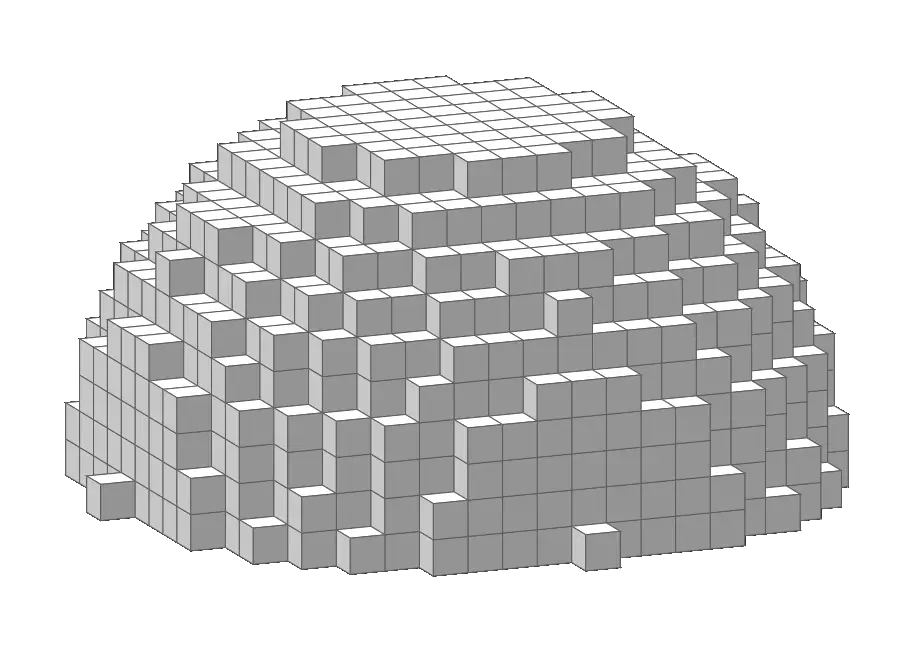
The complete dome maker for Minecraft, voxel-accurate, layer-by-layer blueprint with real-time 3D preview and a built-in dome calculator. Build dome roofs, ceilings, greenhouses, bases and half-spheres in any size.
Height is roughly half the diameter for a classic dome roof. Click any card to open it pre-loaded in the generator.
Every dome is generated from a diameter, a height, and a curve factor that controls the profile of the roof. The generator calculates each ring's radius using the formula:
Where R is the base radius, H is the dome height, y is the current layer, and c is the curve factor. This is exactly how the Mcgic dome calculator works behind the scenes, no manual maths required, just drag the Curve slider and watch the 3D preview update live.
Lower curve values (0.3–0.7) create a wide, gentle dome like a stadium roof. A curve of 1.0 gives a true half-sphere. Higher values (1.5–3) create a steep, pointed dome like an observatory or onion roof.
The generator handles the maths, you handle the blocks.
Drag to rotate, scroll to zoom, auto-rotate for presentations. Face-culled renderer shows only visible block surfaces, so large domes look clean and accurate from any angle.
Switch to 2D Layers mode and use the slider to step through every ring of the dome, from the wide base to the small peak. Ghost mode shows the previous ring as a faint guide.
One slider controls the entire dome profile, flat stadium roof, classic half-sphere, or a steep pointed dome.
Toggle solid fill for a fully solid dome, or leave it off for a hollow shell with custom wall thickness.
Odd-width domes get a faint center-block highlight; even-width domes get crossing lines at the true geometric center.
Download a classic .schematic or modern .schem (Sponge v2) file, paste it directly with WorldEdit, and your dome appears in-game in seconds.
Pinch to zoom, drag to rotate. Controls and exports are neatly tabbed on phones and tablets, build anywhere.
Your dome size, curve factor, block type, color and camera angle are saved to your browser automatically between visits.
From the generator to your first block placed, a complete dome guide.
Enter the base width of your dome. Odd numbers (11, 15, 21, 31) give a true center block and the roundest base ring.
Use roughly half the diameter for height to get a classic half-sphere, then fine-tune the curve factor for a flatter or steeper roof.
Choose from the block library or enter a custom color. The 3D preview updates live as you change every setting.
Drag to rotate your dome from any angle. Enable Auto-Rotate for a continuous spin to check the whole roof structure.
Switch to 2D Layers and drag the slider to step through each ring from the wide base up to the peak. Ghost mode shows the previous ring as a faint guide.
Download a PNG blueprint, copy block coordinates, or export a .schematic / .schem file to paste with WorldEdit directly in-game.
Dome roofs are one of the most requested Minecraft structures, here's what builders use them for.
A dome roof turns an ordinary square house into a striking circular home. Combine with a cylinder base for a complete dome house build.
A glass dome over a farm or garden makes a beautiful greenhouse or biodome, functional and great-looking from inside and outside.
A steep, narrow dome (high curve factor) with a slit cut into the side makes a classic observatory roof for telescope rooms.
A wide, gentle dome (low curve factor) spanning a huge diameter makes an impressive stadium or arena roof.
Cap an underground base or bunker with a dome ceiling for a more natural cave-like feel than a flat roof.
A small snow-block dome with a low entrance makes the perfect igloo for snowy biome builds and survival shelters.
Everything builders ask about dome generation, answered.
Open the generator, pick your size and curve, and get a full 3D preview with a ring-by-ring build guide.